Breaking News :

Latest Post

UNLOCK IDEA 3G NETSETTER & Software Download

Written By Unknown on Friday, 10 August 2012 | 03:36


UNLOCK  IDEA 3G NETSETTER HUAWEI E1732
Idea 3g netsetter E1732  for your laptops & desktops. Now set yourself free from the hassle of wires & installations and experience superfast internet where even the fixed mobile broadband signals fail.
It is an ultra slim USB modem that is ideal for users who need high speed data. For, Installation of this modem there is no requirement of any additional software or drivers.

 
UNLOCK  IDEA 3G NETSETTER HUAWEI E1732

FEATURES:
  • UMTS 2100MHz
  • HSUPA / HSDPA / UMTS 2100 Mhz
  • EDGE / GPRS / GSM 1900/1800/900/850 Mhz
  • HSDPA – 7.2Mbps
  • HSUPA – 5.76Mbps
  • SMS Service
  • Micro SD Card Slot (up to 4GB)
  • Plug & Play
  • Weight: 30g
  • Support data statistics
  • Size Dimensions: Normal
Support :- Windows XP SP2/SP3 , Vista SP1/SP2 , Windows 7, Mac OS X 10.5 & 10.6

UNLOCK  IDEA 3G NETSETTER HUAWEI E1732
REQUIREMENTS

  1. An internet connection (in case net setter data card require device drive then it can download them from internet directly).
  2. Disable Antivirus if you have any (I am using Eset AVAST which i have disabled during unlock procedure)
  3. You must have to download two files, 1) Download CDMA Workshop Full version and 2) Huawei e1732 downgrade firmware. (7zip will be needed to unzip the cdma workshop files)
  4. Make sure that your modem is detected in your PC and you should know the PORT number on which your modem is connected.
  5. Insert any SIM in modem Excepting idea (don’t insert idea SIM).

Steps to Unlock Huawei e1732 Idea Net Setter

  1. Disable Antivirus till the time unlocking is finished, because the crack of “CDMA Workshop v2.7” will be automatically deleted by your antivirus software.
  2. Insert Idea Net Setter modem in you PC/Laptop.
  3. Go to My Computer >> Properties >> Device Manager >> Ports (COM & LPT)  >> HUAWEI Mobile Connect – 3G Application Interface (COM[X]), here X is the port number appear in your system. Note down the com port number in which your huawei e1732 idea net setter is connected.
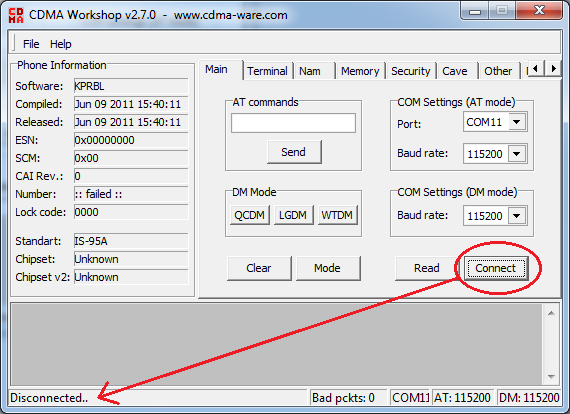
  4. Now OpenCDMA Workshop v2.7.0.exe“.
  5. Under the “Main” tab Select Port number(“COM Settings (AT mode)”) which you have get in step 3 and click on Connect button.
  6. Click on Read button.
  7. Go to “Security” tab > Type “000000” in the blank box under SPC. Click on SPC button >> Send button with Default (nv_read) as SPC.
  8.  Now Go to “Memory” tab and in NV Items section Click on Read button. A Conform box will appear, just click OK and you will see a NV Items Backup box. In the box “Last NV Item” type “9999”  and Click OK. Save the file by giving a file name you like (i.e. E1732Unlockfile etc.)


  9. Once the buffer reach 100% your file is saved successfully, now click OK on Information box.
  10. Minimize the “CDMA Workshop v2.7.0.exe” application.
  11. Now Open E1732 Downgrader application and run it. Accept the license agreement and click Next >> Wait for a few seconds until the search for your modem finishes.
    (Don’t mark “Auto remove the device after update” check box) and click next and Start.
  12. At the end of  Downloading Programs… you will get an “Update Failure!” error message box, just go ahead and click OK and then Finish.
  13. Again Maximize “CDMA Workshop v2.7.0.exe” application.
  14. Go to “Main” tab and Click on Finish button – Unplug your idea net setter now.
  15. Again Plugin your idea net setter modem in the computer and again find the Port number from device manager (as discussed in step 3)
  16. Now go to “CDMA Workshop v2.7.0.exe” and select the Port that you noted from your device manager
  17. Go to “Main” tab and click on “Connect”.
  18. Go to “Memory” tab and click on NV Items >> Write button. On confirm box click “OK” >> “Open” dialog box will appear. Choose the file that you saved before and wait till the buffer reaches to “100%” a “Information” dialog box appears with a success message.
  19. Click “OK”  and go to “Main” tab >> Disconnect.
  20. Now close “CDMA Workshop v2.7.0” >> A “Confirm” dialogue box will appear >> Click “NO”
  21. Now you have successfully unlocked it  
  22.  

Unlock Huwaei E1550 USB Modem – Idea 3G & Idea 3G Modem Hacking

If you are having Huawei E1550 Idea 3G 3.6 Mbps USB Modem and you want to unlock it then visit the following link for the full tutorial on how to Unlock huawei E1550 USB Modem :

and if you are sure about you bearing an Idea 7.2 Huawei E1732 Device then Read ahead for the step by step unlocking tutorial.


Below are the Specification of the Huwaei E1732 USB Modem I Unlocked :
  • UMTS 2100MHz
  • HSUPA / HSDPA / UMTS 2100 Mhz
  • EDGE / GPRS / GSM 1900/1800/900/850 Mhz
  • HSDPA – 7.2Mbps
  • HSUPA – 5.76Mbps
  • SMS Service
  • Micro SD Card Slot (up to 4GB)
  • Plug & Play
  • Weight: 30g
  • Support data statistics
  • Size Dimensions: Normal
  • System Requirements : Windows XP SP2/SP3 , Vista SP1/SP2 , Windows 7, Mac OS X 10.5 & 10.6
This Tutorial is just for educational purpose and of course to Unlock your own Huawei E173X USB Modem. Don’t worry unlocking your modem is not at all illegal as you risk your warranty and your device while doing so.
So, lets move on to our main theme now – Unloacking Huawei E1732 USB Modem.
Unlock Huawei E1732 USB Modem - Idea 3G [Solved & Working] - Featured IamgeYou are gonna require some Huawei Unlocking Tools to unlock your modem. I got them on some forum, have archived them and uploaded for everyone of you. You can get them downloaded from the below link.
Download Huawei E1732 3G USB Modem Unlocking Tools By Clicking Here.
(Note : You have to wait for 5 Seconds and then Click on SKIP AD to directly download the file)
This archive contains five files as below :
1 – Universal Master Code
2 – Huawei E173X Firmware Download (Downgrade – Unlocked Firmware)
3 – Huawei Mobile Partner
How to Unlock Huawei Idea E1732 3G 7.2 Mbps USB Modem :
Step 1 :
Note down the IMEI Number of your USB Modem from the box or from the back side of your USB Modem.
Step 2 :
Extract the downloaded archive and open the first file named ‘ 1 – Universal Master Code. ‘ In the Universal Master Code, put your USB Modem IMEI Code as noted in step 1 and then generate the Flash Code and Unlock Code.
Universal Master Code
Step 3 : Plug the Idea Huawei 3G 7.2 Mbps E1732 USB Modem in your USB and let it complete driver installation.
Step 4 :
Open the second file in the archive i.e ’ 2 – Huawei E173X Firmware Download (Downgrade) ’ this will replace your existing firmware and install the unlocked version firmware for your modem. The installation is automatic and safe if you follow all the instructions while installing it. Don’t worry at all about loosing your device cos if installation fails it backs up your original firmware and you will get it back but locked.
Also while starting the installation of the unlocked firmware it will ask you for the flash code. Insert the Flash Code you got calculated by Universal Master Code.

This will take a few minutes and then we move to the next step.
Step 5 :
After Downgrading the firmware. Remove the device from you computer. Now Install Huawei Mobile Partner, which is the third file in your downloaded archive. While the installation is in process, change the sim card in your usb modem, remove the bundled Idea 3G sim card and insert any other network/carrier sim card you want to use in it.
Step 6 :
After you are done installing Huawei Mobile Partner and swapping the sim card in you USB Modem, open the Huawei Mobile Partner Application and then insert the USB Modem with different network sim card.
After the Mobile Partner is done detecting your USB Modem Device, it will pop up asking you for the Unlock code saying the device is locked.
Step 7 :
In the pop up box of Huawei Mobile Partner asking you for the unlock code, insert the unlock code you generated using Universal Master Code.
Hurray Finally Your Huawei E1732 USB Modem is unlocked. Now you can do your personal settings in your mobile partner and connect to the internet and use services. To check if your modem is successfully unlocked see if the mobile partner software is displaying your carrier name and is showing available network.
Guys, if your modem unlocking procedure is unsuccessful or if you are unable to unlock your modem due to some reasons, then just don’t worry, we are here to help you out.. :)

This Tutorial is just for educational purpose and of course to Unlock your own Huwaei E155X USB Modem. Don’t worry unlocking your modem is not at all illegal as you risk your warranty and your device while doing so.
So, lets move on to our main theme now – Unloacking Huwaei E1550 USB Modem.
You are gonna require some Huwaei Unlocking Tools to unlock your modem. I got them on some forum, have archived them and uploaded for everyone of you. You can get them downloaded from the below link.

Sandisk USB Flash Drive Price & Access Software Download

The drive designed with a low-profile for your notebooks, tablets, TV's or car audio. Plus, you can also keep your private files private, with the included SanDisk® SecureAccess™ software†† , and enjoy the added protection of secure online backup (up to 2 GB* optionally available) offered by YuuWaa . When your data matters, you can trust SanDisk®
32GB
Item# SDCZ33-032G-B35
More capacity for more storage
16GB
Item# SDCZ33-016G-B35
More capacity for more storage
8GB
Item# SDCZ33-008G-B35
Enough room for your work files and your personal files
4GB
Item# SDCZ33-004G-B35
Extra capacity lets you store and transfer more files

Airtel 3G free for pc 2012


So friends this post is for you, by using these trick you can enjoy Airtel 3G service at free of cost on your computer.
Airtel 3G h-a-c-k :
Free Airtel 3G Internet For Your


Computer
Step 1: Connect via AIRTELMMS.COM(MOST IMPORTANT)..
IF U WANT IT EASY THN GO TO DEVICE MANAGER..SELECTTHE MODEM..IN ADVANCE TAB..IN COMMAND SIMPLY PASTE
{ +CGDCONT=1,”IP”,”AIRTELMMS.COM” }
WITHOUT BRACKETS
Step 2: CREATE A DIALUP CONNECTION….
Step 3: IT WILL CONNECT…AS NO NETWORK ACCESS
Step 4: GO TO CONNECT TO..U WILL SEE CONNECTED…
Step 5: RIGHT CLICK …LEFT CLICK PROPERTIES
Step 6: GO TO NETWORKING TAB
Step 7: CHECK ALL THE CHECKBOXES
Step 8: CLICK ON INTERNET PROTOCOL VERSION(TCP/IP)
Step 9: CLICK ON PROPERTIES
Step 10: SELECT USE THE FOLLOWING DNS SERVER ADDRESSES
Step 11: ENTER ANY FREE DNS SERVER..I RECOMMEND
156.154.70.1
202.138.96.3
Step 12: CLICK OK
Step 13: AGAIN OK
Step 14: A MSG APPEARS
” SETTING WILL TAKE PLACE NEXT TYM U DIAL IT”
CLICK OK
Step 15: GO TO START- CONNECT TO - DISCONNECT
Step 16: RECONNECT
Step 17: OPEN ANY WEBSITE ………..
Enjoy Free Airtel 3G… Above trick works at any balance with No Balance Deduction…


Windows 8 Free Download

Written By Unknown on Thursday, 9 August 2012 | 20:44

Windows 8 Release Preview ISO images

Note before you download: Windows 8 Release Preview is prerelease software that may be substantially modified before it’s commercially released. Microsoft makes no warranties, express or implied, with respect to the information provided here. Some product features and functionality may require additional hardware or software. 


ISO images

An ISO image must be converted into installation media stored on a DVD or a USB flash drive. Instructions are provided on this page. Developer tools are available for download from Windows Dev Center.
Important: If you decide to go back to your previous operating system, you'll need to reinstall it from the recovery or installation media that came with your PC, which is typically DVD media. If you don’t have recovery media, you might be able to create it from a recovery partition on your PC using software provided by your PC manufacturer. Check the support section of your PC manufacturer’s website for more information. After you install Windows 8, you won’t be able to use the recovery partition on your PC to go back to your previous version of Windows.

English

64-bit (x64)                    Download (3.3 GB)                    Sha 1 hash — 0xD76AD96773615E8C504F63564AF749469CFCCD57

32-bit (x86)                    Download (2.5 GB)                    Sha 1 hash — 0x8BED436F0959E7120A44BF7C29FF0AA962BDEFC9

Product Key:   TK8TP-9JN6P-7X7WW-RFFTV-B7QPF

System Requirements

Windows 8 Release Preview works great on the same hardware that powers Windows 7:
  • Processor: 1 gigahertz (GHz) or faster
  • RAM: 1 gigabyte (GB) (32-bit) or 2 GB (64-bit)
  • Hard disk space: 16 GB (32-bit) or 20 GB (64-bit)
  • Graphics card: Microsoft DirectX 9 graphics device with WDDM driver
Additional requirements to use certain features:
  • To use touch, you need a tablet or a monitor that supports multitouch.
  • To access the Windows Store and to download and run apps, you need an active Internet connection and a screen resolution of at least 1024 x 768.
  • To snap apps, you need a screen resolution of at least 1366 x 768.
  • Internet access (ISP fees might apply)
 

Samsung GALAXY Note 10.1

Samsung GALAXY Note 10.1 Product Specifications 

Network 
 HSPA+ 21-Mbps (HSDPA 21Mbps / HSUPA 5.76Mbps)
 Quad Band 850/900/1900/2100 MHz
Processor
1.4 GHz quad-core processor
Display
255.8mm (10.1”) WXGA(1280x800) LCD + Digitizer
OS
Android 4.0 (Ice Cream Sandwich)
Camera
Main(Rear): 5 Megapixel Auto Focus Camera with LED Flash
Sub(Front): 1.9 Megapixel VT Camera
Video
Codec: MPEG4, H.263, H.264, VC-1, DivX, WMV7, WMV8, WMV9, VP8
Format: 3GP(MP4), WMV(ASF), AVI, FLV, MKV, WebM
Full HD(1080p) Playback & HD Recording
Audio
Codec: MP3, OGG, WMA, AAC, ACC+, eAAC+, AMR(NB,WB), MIDI, WAV,
              AC-3, Flac 
Music Player with SoundAlive
3.5mm Ear Jack
S Pen Optimized
Features
S Pen Experience (S Note, S Planner, My Story)
(* more S Pen optimized apps are available via Samsung Apps) 
Multiscreen
Adobe® Photoshop® Touch
Shape Match, Formula Match
Polaris Office
Sharing
Features
Samsung AllShare Play / Samsung AllShare Cast
Samsung Kies /Samsung Kies Air
Content Features &
Services
Samsung TouchWiz / Samsung L!ve Panel
Samsung Apps
Samsung Hub 
-Music Hub / Game Hub 
-Learning Hub* / Readers Hub* / Video Hub* / Media Hub*(US only)

(Availability of Learning Hub and Video Hub are limited by market.
 Readers Hub will be available to download from Samsung Apps later this year) 
Samsung S Suggest
Samsung ChatOn mobile communication service
Google Search, Google Maps, Gmail, Google Latitude
Google Play Store, Google Play Books, Google Play Movies
Google Plus, YouTube, Google Talk,
Google Places, Google Navigation, Google Downloads
Enterprise 
Solutions
Exchange ActiveSync
On-Device Encryption
Cisco VPN (Virtual Private Network)
Juniper Junos Pulse VPN
GPS
A-GPS(3G version)
S-GPS(WiFi version)
Glonass
Connectivity
Bluetooth technology v 4.0 (Apt-X Codec support)
USB 2.0 Host
Wi-Fi 802.11 a/b/g/n (2.4 & 5 GHz), Wi-Fi Direct, Wi-Fi Channel Bonding
mHL, 3.5mm, IR LED(Smart Remote: Universal Remote Control)
Sensor
Accelerometer, Digital compass, Light, Gyroscope
Memory
16/32/64GB User memory + 2GB (RAM)
microSD (up to 64GB)
Dimension
262 x 180 x 8.9 mm, 600g (3G), 597g (WiFi)
Battery
Standard battery, Li-ion 7,000mAh

Sri Ganesh Hosting, Web Hosting


Sri Ganesh Hosting brings you value for money hosting and domain name registration services that are perfect for anyone looking for a strong online presence. We provide the best possible hosting solutions to all our clients with a guaranteed 99.9% uptime. We have excellent Linux hosting packages with PHP and MySQL Database support.

Samsung 75-inch ES9000 smart TV makes stateside debut: on sale in August for $9,999


The mammoth 75-inch ES9000 LED smart TV that Samsung recently unveiled for the Korean market is making its way stateside. Today the 3D-capable, LED-backlit set was on display in New York as part of the Sammy-sponsored SpaceFest marking the Space Shuttle Enterprise's arrival at the Intrepid. How smart TVs relate to Space Shuttle orbiters is beyond us, but the ES9000's US debut is welcome news for those with a massive living room to fill, and were disappointed after the ES8000 75-incher shown at CES and even given a price tag earlier this year failed to materialize.
Detailed specs are currently MIA, but as we noted before in our hands-on, the 75-incher's bezel measures just 0.31 inches, and the frame sports a rose-gold finish. There's also a built-in web camera that retracts when not in use, and the TV comes with four pairs of 3D glasses. Being a smart TV, this guy also includes the full suite of Smart TV features, such as Smart Interaction for enabling gesture and voice controls and Smart Content for sharing media across several devices. Samsung also used today's occasion to introduce a new Angry Birds app for its smart TVs, which lets users play the game entirely with gesture controls. The app will be available for a free download later this month, and the ES9000 will go on sale in August for a super-sized price of $9.999. Check out the PR below for more info.

Samsung announces 75-inch ES9000 smart TV for Korea, with similarly gigantic price tag (eyes-on)

Written By Unknown on Wednesday, 8 August 2012 | 23:41

Anyone looking to fill half of their lounge with Samsung LCD just got a new size to choose. The 75-inch ES9000 is the bigger brother of the ES8000 that we saw earlier this year and ahead of the official launch in Korea, we managed to get an early eyes-on at a Samsung event held yesterday in London. In short, if you loved the LED-backlit display of the 55-inch model, you're going to adore the ES9000, which features the same smart TV brains alongside a retractable webcam unit housed on the top edge. The picture was pleasingly rich and sharp -- presumably due to the aforementioned backlighting and the ES series' edge-to-edge design. The bezel is a mere 7.9mm and Samsung has decided to coat the frame in a gentle Rose Gold coating which, due to the TV's slightly shady location, was a little trickier to pick out. That premium finish is matched by a premium price tag, however, and will hit checkbooks for 19.8 million won (around $17,450). Despite the UK appearance, retailer John Lewis (which hosted the event) couldn't confirm whether retail models would be coming to its stores in the future. But if you can afford 75 inches of TV, you can also afford a quick flight to Seoul to pick one up.

FTalk Download & facebook Chat Software Install

The only way to chat with your Facebook friends right from your desktop!
 

Why fTalk?

  • Faster and more accessible than Facebook chat
  • No need to open Facebook
  • Get notified when friends come online
  • Update your status right from the app
  • Free and easy to use
  • Cool emoticons

Dynamic URLs vs. Static URLs

Written By Unknown on Tuesday, 7 August 2012 | 21:45

URL is most important things for the website regarding SEO. There are two types of URLs: first is dynamic and second is static URL. The dynamic URL is a page addresses that if anyone makes a search or action on the pages then the page URL driven from database. But static URL is become very simple, file name become the URL of that page.

Dynamic website such as e-commerce stores, forums, content management system (CMS) site, blogging site like WordPress, Mambo and other website that’s pages comes create dynamically like.
http://xyz.org/money/Country.aspx?c_code=256&id=2451633
http://xyz.org/money/Country.aspx?c_code=256&id=2451634
http://xyz.org/money/Country.aspx?c_code=256&id=2451635
http://xyz.org/money/Country.aspx?c_code=256&id=2451636
http://xyz.org/money/Country.aspx?c_code=256&id=2451637
http://xyz.org/money/Country.aspx?c_code=256&id=2451638....

All of the above six URLs end with six different landing pages but when search engine tends to remove the information subsequent to the first offering character because the question (?) marks ultimately all six pages become identical as:
http://xyz.org/money/Country.aspx
Your unique pages have become identical and according to search engine URL’s contains the duplicate name which not be indexed by search engines.
Sample Static page: http://xyz.org/money/Country.aspx Sample Dynamic Page: http://xyz.org/money/Country.aspx?c_code=256&id=2451635
Another problem with dynamic pages is keywords, because the dynamic pages generally do not have any keywords in the URL. The keyword is very important things for URL, if you are using the rich keyword in your URL (also domain name) then it’s good for your site according to search engine.

This is clear in recent study on URL the top three search engines Google, Yahoo! And MSN easily indexed your keyword used URL. Google search engine choose 40-50% of those with the keyword either in the URL or on with domain name, Yahoo! Show 60% and MSN show up to 85%.

Samsung Galaxy S iii 3 Price India

Written By Unknown on Sunday, 8 July 2012 | 12:23

Samsung is launching super awesome mobile phone in galaxy series, its new Samsung Galaxy S3. Galaxy S3 or Siii comes with ice-cream sandwich, android version 4. Price of Samsung Galaxy s3 in India is 38,900 on flipkart.
Samsung Galaxy S3 Price in India 300x180 Samsung Galaxy S iii 3 Price India
Samsung Galaxy S 3 iii Price India
Samsung galaxy s3 specifications / features :
Android v4.0 (Ice Cream Sandwich) OS
8 MP Primary Camera
1.9 MP Secondary Camera
4.8-inch Super AMOLED Capacitive Touchscreen
1.4 GHz Quad Core Processor
Wi-Fi Enabled
Expandable Storage Capacity of 64 GB
Again, the price of samsung galaxy s3 is 38,900 in india.

Trick To Boost Torrent Speeds Using UTorrent Turbo Booster Plugin


uTorrent Turbo Booster is a recent plug-in designed to improve the functionality of probably the most popular P2P file sharing application around – uTorrent. 
 
This tool comes equipped with modern technology that aims at getting your download speed way up so you can grab the files you want so badly much quicker than you’ve been used to. Movies, music, games, applications, you name it - uTorrent Turbo Booster will deliver at a fast pace. It will be there doing its job in the background without upsetting any other activity you might perform on your computer.

So Now Click On Given below Link For Download  UTorrent Turbo Booster Plugin


Samsung Galaxy tab 2 10.1

Samsung Galaxy Tab 2 is the much anticipated sequel to Samsung Galaxy Tab. The tablet will sport a 10.1" screen and be powered by the latest Android Ice Cream Sandwich OS. The tablet is expected to be available in India by second half 2012

Mobile Details

Display and Specification Samsung Galaxy Tab 2 10.1 features a 10.1" 16-M color PLS LCD Capacitive touch display. The tablet runs on Android Ice Cream Sandwich 4.0 and is powered by a 1GHz Dual core processor.
Camera and Multimedia
Samsung Galaxy Tab 2 10.1 has a 3.2 MP auto-focus camera that lets you record videos at 1080p video.The tablet also features a secondary VGA front facing camera for video conferencing.The tablet lets you watch any video without conversion with DIVX/XVID support.
Connectivity Options
The tablet supports quad band 3G through UMTS and quad band 2G through EDGE. The tablet also has inbuilt dual band Wifi a/b/g/n and Wifi direct . The tablet has Assisted GPS for navigation. Bluetooth 3.0 and 30pin connector to cater to other connectivity needs
Battery and Storage
Samsung Galaxy Tab 2 comes with a 7000mAh battery.The phone has 16 or 32 GB internal memory which can be further expanded using a micro SD card.

Technical Specification of Samsung Galaxy Tab 680

Best Price: Rs. 35600 
Display
Display Type:7.7 inch Super AMOLED Plus 1280 x 800 pixels
Camera
Primary Camera:3 megapixels
Secondary Camera:2 megapixels
Flash Support:LED Flash
Other Camera Features:Auto Focus, Multi-shot Mode, Photo Effects, White Balance
Memory
RAM:1 GB
Dimensions
Dimensions:196.7 x 133 x 7.89 mm
Weight:340 g
Storage
Internal Storage:16 GB
Expandable Storage Capacity:32 GB
Memory Card Slot type:microSD
Battery
Battery Type:5100 mAh
Talk Time:34 hrs (2G), 20 hrs (3G
Standby Time:1200 hrs (2G), 1100 hrs (3G)
Play Time:9 hrs (Video)
Business Features
Mail Features:Email
Multimedia
Video Playback:Yes , Full HD Playback
Video Formats Supported:MPEG-4, H.263, H.264, WMV, DivX, Xvid
Audio Formats Supported:MP3, eAAC+, WAV, FLAC, AC3, MIDI
Internet Connectivity
Wi-Fi:Yes , 802.11 a/b/g/n
3G:Yes , HSPA 21 Mbps
Other Internet Connectivity Options:GPRS , Edge
Pre-Installed Browser:Android
Platform
Operating System:Android 3.2 (Honeycomb)
User Interface:TouchWiz UX User Interface
General
Series:Galaxy Tab
Processor:1.4 GHz Dual Core
Voice Call:Yes
Supported Networks:2G: GSM 850, 900, 1800, 1900; 3G: UMTS 2100
Navigation
GPS:Yes , A-GPS
Map Support:Google Maps
Connectivity
Other Connectivity Features:Wi-Fi Channel Bonding
USB:Yes, USB 2.0
Audio Jack:3.5 mm Headphone Jack
Bluetooth:v3
Additional Features
Social Hub, Readers Hub, Game Hub, Image and Video Editor, Video Maker, Mini Apps, Live Panel, Clipboard, Video Telephony, 30 Pin Connector, Glonass, SNS Integration, Instant Messaging, Android Ecosy

Technical Specification of Samsung Galaxy S3

  • Samsung Galaxy S3 is the sequel to the extremely successful Samsung Galaxy S2.
  • Samsung Galaxy S3 has a massive 4.8'HD Super AMOLED touchscreen with resolution 720 x 1280 pixels
  • The phone runs on Android 4 Ice Cream Sandwich OS, powered by 1.4GHz Quad Core processor
  • The phone has an 8MP camera with auto focus, LED Flash and has a 1.9 MP secondary camera
  • The phone comes with unique features such as Smart Stay, S-Voice, Direct call etc
  • Samsung Galaxy S3 comes in models with 16GB, 32GB and 64GB internal memory
  • The phone has a massive 2100 mAh Li-ION battery 
Display
Type:Super AMOLED
Size:4.8 Inches
Resolution:HD, 720 x 1280 Pixels
Colors:16 M
Camera
Primary Camera:Yes, 8 Megapixel
Secondary Camera:Yes, 1.9 Megapixel
Video Recording:Yes, 1280 x 720, 30 fps
Flash:LED
Other Camera Features:Geo-tagging, Touch Focus, Face and Smile Detection, Image Stabilization, Auto Focus, Image Editor
HD Recording:HD
Dimensions
Size:70.6 x 136.6 x 8.6 mm
Weight:133 g
Battery
Type:Li-Ion, 2100 mAh
Talktime:22.5 hrs (2G), 11 hrs (3G)
Standby Time:830 hrs (2G), 770 hrs (3G)
Memory and Storage
Internal:16 GB
Expandable Memory Slot:microSD, upto 64 GB
Internet & Connectivity
Internet Features:Email
GPRS:Yes, Class 12, 48 kbps
3G:Yes, 21 Mbps HSDPA; 5.76 Mbps HSUPA
Edge:Yes, Class 12
Wifi:Yes, 802.11 a/b/g/n
Tethering:Wi-fi Hotspot
USB connectivity:Yes, micro USB, v2
Bluetooth:Yes, v4
GPS Support:Yes, A-GPS with Google Maps
Audio Jack:3.5 mm
DLNA:Yes
Multimedia
Music Player:Yes, Supports MP3, WAV, eAAC+, AC3, FLAC
Video Player:Yes, Supports MP4, DivX, XviD, WMV, H.264, H.263, HD Video Playback
FM:Yes
Ringtone:MP3, WAV
Platform
Operating Frequency:GSM - 850, 900, 1800, 1900; UMTS - 2100
OS:Android v4 (Ice Cream Sandwich)
Java:Yes
User Interface:TouchWiz 4.0
Processor:1.4 GHz
Graphics:Mali-400MP
General Features
Form:Bar
SIM:Single SIM, GSM
Keypad:No
Touch Screen:Yes, Capacitive
Call Features:Loudspeaker
Business Features:Document Viewer, Document Editor, Pushmail
Other Features
Call Memory:Yes
SMS Memory:Yes
Sensors:Accelerometer, Gyro Sensor, RGB Sensor, Proximity Sensor, Barometer, Compass
Phonebook Memory:Yes
Additional Features:S Voice, Social Tag, S Beam, Wi-Fi Direct, Voice Input
Important Apps:AllShare Play
Price : Rs. 38,900

    Airtel Live and Airtel GPRS settings on Mobile

    Written By Unknown on Saturday, 7 July 2012 | 23:08


    Airtel GPRS and Airtel live are two different service from Airtel.
    Airtel Live is free and restricted to free sites whereas Airtel GPRS is paid service and you have access to all the website and you can also connect your mobile Internet to PC.
    Anyways you need this settings to access Airtel free GPRS settingswhich you can read on my earlier post.
    These are the ways you can activate your GPRS and Airtel Live settings:
    Send MO to 2567 from your Airtel mobile (2567is a toll free number).
    You will receive settings for Airtel Live, Airtel mobile office i.e Airtel GPRS and Airtel MMS.
    Save the settings you want to use.
    If you want to surf only limited site then I will recommend Airtel Live, specially when you are using Free GPRS trick that will be useful for you.
    Else you can go ahead and save the settings for Airtel mobile office and Airtel MMS.
    Now to activate Airtel GPRS you need to send GPRSACT from your Airtel number to 511( which is a toll free number). Do remember Airtel GPRS is not a free service and you will be charged as 20 rs per day.
    But there is unlimited downloading on Airtel GPRS service (the paid one).
    You can also deactivate it by sending a message GPRSDEACTto 511.
    Though Airtel Live is activate by default but in case Airtel live is deactivated you can activate it by sending LIVEACT to 511 and to disable it LIVEDEACT to 511.
    If you are wondering how to activate Airtel GPRS on your iPhone, FYI Airtel Sim doesn’t require any kind of configuration for GPRS to work on iPhone. Simply activate your GPRS on Airtel Sim and insert it and start browsing. I would suggest to opt for Airtel 98INR -2GB pack for ultimate GPRS experience on your Airtel.
    You can subscribe to feeds to receive regular updates on Latest tips and tricks and If you are a Airtel user I will recommend you to read this two articles.

    MCSE TRAINING KIT

    Written By Unknown on Sunday, 25 September 2011 | 09:18


    The following file is a torrent file which you can open with torrent clients like uTorrent


    C++ Video Tutorials from Virtual Training


    C++ Video Tutorials from Virtual Training
    Author: L. Lee | ISBN: 1930519079 | Duration: 5 hrs / 43 lessons | Video Format: .mov (QuickTime Movie)
    Compatibility: Win Vista, XP, 2000, Mac OS X, Linux

    C Plus Plus (C++) is a programming language that is both procedure-oriented and object-oriented. In VTC?s tutorial, Professor Arthur Lee will explain the environment of C++, then guide you into writing equations, creating functions and output, looping, and much more.

    • Quick and easy way to learn C++ through a series of movies.
    • No expensive classroom training courses
    • No boring hard to follow books to read
    • Learn from your own desk at a pace that suits you
    • High quality affordable training that is easy to use and follow
    • Use our unique training method, it makes learning easy no matter what your learning style


    The following file is a torrent file which you can open with torrent clients like uTorrent


    Windows 7 eBook


    Download Free Windows 7 eBook

     It’s the best *free* ebook out there that you will find. If you want to know what it’s all about read the description below.


    eBook Contents


    Page 1: Index
    Page 2: Disclaimer

    Disable/Enable Section

    Page 3: Disable Windows 7 Hibernation

    Page 4: Disable Windows 7 Indexing

    Page 8: Enable DreamScene in Windows 7!

    Page 9: Enable Hidden Administrator Account

    Page 16: Enable/Disable hidden files in Windows 7


    Media Player Section

    Page 5: Windows Media Player Security Component Upgrade Fix (DRM)


    Hardware Section

    Page 6-7: Two Windows 7 CPU Temperature Monitoring Solutions


    Speed Up Section

    Page 10: Speed Up Windows 7 Boot

    Page 11-12: Speed up Windows 7 Taskbar Thumbnail Preview


    Page 13: Speed Up Windows 7 Shutdown Time

    Page 15: Speed Up Application Access – Increase your productivity


    eBook can be download here:


    Windows 8 Shell Themes (for Windows 7)


    This theme modifies the progress bar, the start panel, the explorer shell, the start orb, the login screen and much more.


    The following file is a torrent file which you can open with torrent clients like uTorrent. The archive includes several Windows 8 themes:


    Skin Pack Installer System

    Written By Unknown on Saturday, 20 August 2011 | 03:34

      Now no need to create long and complicated scripts, no need to spend many hours in creating customization packs or transformation packs or skin packs for Windows Vista and 7.

    Our friend "hameddanger" @ DA has done tremendous job in creating a free and easy to use installer system which helps you in creating skins packs quickly and easily.

    "Skin Pack Installer System" allows you to replace existing images, icons, media files, etc in Windows system files automatically by a simple drag-n-drop function. It shows buttons for almost all system files which need to be modified by a skin pack to customize Windows UI. When you click on the button, it opens a folder which contains the resources of that file. Replace the resource with your desired one and click on "Create Setup" button.


    You can also set your theme, wallpaper, cursor, sound scheme, etc with the help of this awesome software.

    Click on the "Help" button and check the images to get more details about using this tool.

    It also contains useful tool like Resource Hacker, Resource Extractor, Renamer, Convert PNG to BMP, etc to make your task easier.

    Really an excellent and useful tool for people who want to create their own transformation or customization pack.

    You can download it using following link:


    Download Skin Pack Installer System (32-bit)


    Download Skin Pack Installer System (64-bit)


    8 Skin Pack 2.0 For XP


    Transform XP to 8
    Support:
    - Windows XP (Home, Pro, RTM, SP1, SP2, SP3, Corporate)
    - Windows 2003 (Standard, Enterprise, Datacenter, Web, RTM, SP1, SP2)
    - Windows Media Center Edition (2003, 2004, 2005)
    - Windows XP Tablet PC Edition
    - All Language Versions
    Note : Before install close all runnig program , after finish restart your system .
    Skin Packs installer have easy and safe install option , its better to unistall old or other version of skin packs.

    Programs:
    Note : Some Program Need to install .Net FrameWork 4.0 For Runnig


    8 Skin Pack X64 V4.0 Win 7


    Transform 7 to 8
    Support:
    Windows 7 , Windows 7 SP1 , Windows Server 2008 R2 , Windows Server 2008 R2 SP1 - [X64 (64Bit)] - [All Language]

    Note : Before install disable user account controller and close all runnig program , after finish restart your system , in windows server make sure theme service is runing .
    Skin Packs installer have easy and safe install option , its better to unistall old or other version of skin packs.

    Programs:
    Note : Some Program Need to install .Net FrameWork 4.0 For Runnig


    7 Skin Pack 6.0 For XP

    Transform XP to 7
    Support:
    - Windows XP (Home, Pro, RTM, SP1, SP2, SP3, Corporate)
    - Windows 2003 (Standard, Enterprise, Datacenter, Web, RTM, SP1, SP2)
    - Windows Media Center Edition (2003, 2004, 2005)
    - Windows XP Tablet PC Edition
    - All Language Versions
    Note : Before install close all runnig program , after finish restart your system .
    Skin Packs installer have easy and safe install option , its better to unistall old or other version of skin packs.

    Programs:
    Note : Some Program Need to install .Net FrameWork 4.0 For Runnig


    Ubuntu Skin Pack 4.0 For XP


    Transform XP to Ubuntu
    Support:
    - Windows XP (Home, Pro, RTM, SP1, SP2, SP3, Corporate)
    - Windows 2003 (Standard, Enterprise, Datacenter, Web, RTM, SP1, SP2)
    - Windows Media Center Edition (2003, 2004, 2005)
    - Windows XP Tablet PC Edition
    - All Language Versions
    Note : Before install close all runnig program , after finish restart your system .
    Skin Packs installer have easy and safe install option , its better to unistall old or other version of skin packs.

    Programs:
    Note : Some Program Need to install .Net FrameWork 4.0 For Runnig


    Web Browsers

    Mobiles

    Hacking Tricks and Tips

     
    Support : Creating Website | Aman Kamboj | Dewnext
    Template Modify by Creating Website