Breaking News :

Latest Post

Showing posts with label Airtel. Show all posts

How to find PUK code number of SIM Card (mobile phone)

Written By Unknown on Friday, 24 August 2012 | 19:46


How to find PUK code number of SIM Card (mobile phone). Many people use PIN number for their phone to lock some of the stuff or features.But if you enter PIN number 3 times wrong then your SIM card is blocked and will ask PUK number.
If you enter PUK code number 10 times wrongly then your SIM card will be rejected and you have to buy a new duplicate SIM for your mobile phone. Here are the steps to get PUK number for different networks -
simblock PUK number
Airtel:
create a new message from any Airtel number (of your friends or relatives), type PUK <space> PhoneNumber and then send it to 121 (toll free number)
For all other networks:
Call to your customer care number from other SIM card of same network and tell your details to them. They will first verify that you are the owner of that SIM, so they may ask name as registered on form, last call number, billing address, email ID, numbers you recently called, numbers you recently messaged or any other personal details. So keep all these ready when you call, then they will provide a PUK number, enter it and your mobile will be unblocked.


Idea PUK code


To get Idea PUK code for your mobile number send a SMS from any Idea phone type PUK (space) sim number (18 digit number printed on your sim card) & send it to 50505. 

How to check friends mobile Balance in Docomo and Airtel

Written By Unknown on Wednesday, 22 August 2012 | 20:41


Today my friend told me about checking others balance from my phone. So i taught to post this tricks for my fella readers. Impress your friends with this trick....


check friends mobile balance in Docomo


How to check friends mobile balance in Docomo?

Dial 09045012345 Select language by pressing 1 Or 2

Then, Select 1

Type < your friends 10 digit tata docomo no >

Then Select 1.

That's it....Enjoy!!!!


check friends mobile balance in Airtel


 How to check friends mobile balance in Airtel?


Actually this works only for tamil nadu. Try this in your state and share your result.

Dial 12140 from your Airtel mobile number. When the call get connected, Select your language( if you haven ’t changed it).

After the IVR language is selected then Press 2. Now enter your your friend ’s mobile number without any “0″ or +91 at the beginning of the number (enter only 10 digit mobile number). The system replies the mobile number which you entered. Just confirm it by Pressing 1 It will surely ask for the PIN of entered mobile

number. Enter the PIN as 1234. This step is more important. If you finished all the above steps now finally Press 3 to find the balance of any Airtel number.

Working in some states....

How to find PUK code of your SIM Card (Phone Number)

PUK code of your SIM 


Few people use PIN locking system to lock their phone to avoid
un-authorised access.

Though this is a good option, it pisses you off
sometime. Three wrong entry of PIN code

will result in SIM blocking.

Once SIM gets blocked, phone starts asking PUK code to enter. If you
again enter wrong

code for three times, SIM gets completely blocked. You
have to walk into your service provider

outlet to get a replacement SIM
card.

PUK code is a SIM specific code assigned by your service
provider. No way you can guess &

enter it. So, when it asks for the
PUK code, don’t do anything, get the PUK code from your service

provider. Airtel has a easier way of getting PUK code.


For getting PUK
code of a Airtel number, send PUKPhoneNumber to toll free number 121.


You can make use of any other Airtel number to send this message since your SIM might have been blocked already.


If
the above method doesn’t works or your service provider is not Airtel,
call to customer

care using any other mobile phone which uses the same
service provider. They will ask some

details about you to make sure you
are the owner of the SIM card. Questions might include

your billing
address, email ID, numbers you recently called or messaged etc. They
might even

ask you the number printed on the SIM card, so be prepared
with all details before calling them.

Once you get the PUK code, enter
it into the phone & your phone will return to normal.

Airtel 3G Unlimited GPRS Trick And Hack With Fastest Proxy 2012

Written By Unknown on Tuesday, 21 August 2012 | 21:50


Hello friends, here is in  April  & May 2012 latest fast proxy trick for Airtel. This trick is working with Resume support with downloads and with YouTube, Facebook too. You can download by very fast speed also.This trick is working with 2G and 3G both.So just use it and enjoy super fast 3G speed for free.


Follow the Instructions Below :-


Create A New Airtel Manual Settings


Apn : airtelgprs.com


Proxy : 208.77.23.4


Port : 80 


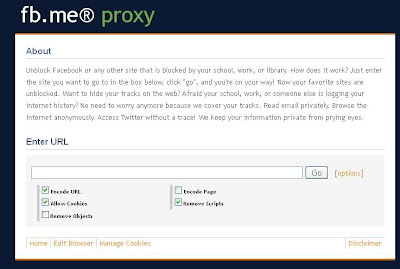
Home Page : fb.me


If Its Not Working Try live.airtelworld.com 


OR


1. First You Need Create New Setting In Your Mobile Phone

Apn – airtelgprs.com

Proxy Address – 141.000.011.253

Port – 80

2. Now You Open Operamini Handler And Use Following Given Below Settings

Proxy Type – Http

Proxy – mocricket.com Or fb.me


OR


1 You should have any Hander like Opera, Mozilla etc. You can download it free on net.

2.  Next Then you choose Proxy Type  as  HTTP

3. Then you choose  Proxy Server as  fb.me


live.airtelworld.com
beta.opera-mini.net
125.21.241.25.beta.opera-mini.net

(or) 

Proxy Type – Real Host

Proxy Server Put :

59.160.229.40
203.115.112.5
122.170.122.214
125.21.241.25
203.200.118.92
10.5.45.107
125.21.241.77

live.airtelworld.com
fb.me


Make the  Following Settings  in your mobile or dongle or manually put in your browser proxy settings:-


Home Page :fb.me

Proxy:interrobangpath.org

Port :80


For resume supported downloads try these settings :-


Home Page: fb.me

Proxy: 176.9.126.177 

Port: 80 


But it has the  file size limit.


For specially youtube users use this fast proxy for streaming:-


homepage=http://fb.me

proxy=anobrowse.com

port=80


New Working In All India Airtel Free GPRS August 2012

Written By Unknown on Monday, 20 August 2012 | 02:41


Just Follow Below Simple Steps:


Step:-1) Make New GPRS Profile/Setting In Your Mobile

Step:-2) APN:- airtelgprs.com
Step:-3) Proxy:- sneakme.net
Step:-4) Port:- 80
Step:-5) Homepage: 122.170.122.214 OR 202.46.201.112 OR 203.115.112.5
Step:-6) Now Save The Settings And Restart Your Mobile..


Enjoy New Airtel Unlimited Free GPRS Trick..

Airtel Free Gprs High Speed Proxies with 100 % working proofs

Written By Unknown on Saturday, 18 August 2012 | 21:57


Hello friends, Good news for Airtel users After a lot of research, I got some useful proxies. 

Guyzzz some readers dont go for the procedure correctly and then they just say that the trick is not working even they comments that "none of my trick is working i am just fooling everyone", So i am making clear myself that there is no profit for me through this blog i am just posting these tricks for all of u for free so dont even think that i m fooling u all And frnz plz its a request that if the trick worked for u than plz comment so others should know that the tricks are working Dont just be an leecher Comment about the tricks whether its working or not if working is there any dissconection problem or if i have made any mistake u can correct it ......Thank You


I have included a proof of screenshots for those who says "that my tricks are not working"


The Trick:


You These Proxies for using free gors.


For  resume download use this proxy


proxy - 72.10.53.126   
port   -   80
homepage -   any free webpage which works in your area.


The speed is quite good.......if download speed slow down then pause and resume again. 


Screenshots Proof:


http://a2xsolution.blogspot.in/search/label/Airtel


I downloaded 600 Mb file with good speed, proxy has download limit upto 1GB. 


And one more thing only for downloading. this proxy not works for browsing


Use This Proxy for Browsing:


proxy - 199.19.107.183 
port   -   80
homepage -  any free webpage which works in your area.


This proxy is specially for browsing purpose only.......  Very good browsing speed and it supports most of the major  ssl sites like gmail, facebook(mobile version) .


And big advantage is that you can stream all youtube videos without buffering, but for big movies there is a limit.


Not so much good for downloading because it has a file limit and no resume support. 


So use this proxy for only stream and browsing purpose only.


Here  is youtube screenshot.


Those who dont have the handler application they can download from here


>>>>>>>>>>>>Enjoy<<<<<<<<<<<<<

Airtel 3G working Trick and Free GPRS Internet Trick August 2012

Written By Unknown on Friday, 17 August 2012 | 05:21


Trick 1 [working from 2nd August 2012]:
Download Youtube videos for free with Airtel free GPRS Trick August 2012:
Create this proxy settings and enjoy free downloading of youtube videos;
Settings:-
PROXY - vuclip.com
PORT - 80
HOMEPAGE - ANY FREE WORKING HOMEPAGE LIKE
203.115.112.5
or
122.170.122.214
or
any other working in your states.


Trick 2 :-
[working from16th July 2012]

Create new GPRS setting in your mobile or change proxy settings in firefox to enjoy free GPRS trick in airtel.
Proxy :: ihide.info
PORT :: 80
HP ::202.46.201.112
203.115.112.5
203.115.112.27
203.115.112.27

Trick 3:
This trick is with dreamvpn proxy which is very fast and download supported. So use this one to enjoy airtel free gprs trick with good surfing experience and downloading speed.

Proxy :: proxy.dreamvpn.us
PORT :: 80
HP ::
202.46.201.112
203.115.112.5
203.115.112.27
203.115.112.27
Special feature : php proxy. Large file download supported.

Airtel 3G Working Trick

Hi.. To All My Dear Visitors.. Welcome in Dewnext.com

Before I'm Posted Free Idea 3G Trick Working All Over India..

Today I'm again back With New Rocking Blasting Trick..

This Time Posting New Airtel Free 3G Trick..


Just Follow Below Simple Steps:

Step:-1) Make New GPRS Profile/Setting In Your Mobile
Step:-2) APN:- airtelgprs.com
Step:-3) Proxy:- 72.10.53.126 OR 63.141.241.219
Step:-4) Port:- 80
Step:-5) Homepage:- www.google.com
Step:-6) Now Save The Settings And Restart Your Mobile..
 Now You Can Enjoy Free Unlimited 3G On Airtel..


Free Airtel Working 3G Gprs Trick Hack, Airtel 3G Hacking

Written By Unknown on Sunday, 12 August 2012 | 08:08

Airtel Free Working High Speed Gprs Trick-August 2012

Before going to post note that this trick support browsing+downloading but this will ban anytime.So friends use this before ban.Here is the setting below to get Airtel Fast downloading+browsing trick with 3G support


Account Name= Airtel Gprs Trick


APN=airtelgprs.com


Proxy Address= 72.10.53.126

OR

63.141.241.219

PORT=80


HP=Any free site{also put google.com}

Restart your mobile phone and start surf free Airtel gprs trick with downloading speed.And if you are in 3G area then you will get Airtel 3G speed.


AIRTEL GPRS TRICK 100% WORKING|3G|2G|GET UNLIMITED INTERNET


AIRTEL GPRS TRICK 100% WORKING|3G|2G|GET UNLIMITED INTERNET
Airtel is one of the largest service provider in India.There are a lot of tricks to get free Internet from airtel in which one of the trick is airtel dotproxy trick.This trick is working Fine all over India.All you have to do is follow the steps below.
AIRTEL GPRS TRICK 100% WORKING|3G|2G|GET UNLIMITED INTERNET

Here  are the steps  :
  • Use APN: Airtelgprs.com
  • Now download dot proxy from Here:
    DOWNLOAD DOTPROXY
  • Edit url modes with one of following backquerry
    • 0:?live.airtelworld.com/wps/portal?%3f0.facebook.com/%3f0:?live.airtelworld.com/wps/portal?%3f0.facebook.com/%3fzout=1
    • 0:?0.facebook.com/?zout=1
  • leave all other  blank as it is!!

Note: Use Following proxy settings in browser and download managers when you are using DotProXy. proxy: 127.0.0.1
port:8080

NOW HOW WILL YOU CHANGE PROXY SETTINGS FOR AIRTEL?

  • Press ALT
  • Click on Tools
  • Now Select option
  • Now Select Advance in pop up menu
  • And select Network
  • Now Click on Setting
  • Now click on Manual..
  • And Add Given Proxy and Port
Friends hope you have enjoyed this dot proxy trick now you can comment below. 

Airtel 3G free for pc 2012

Written By Unknown on Friday, 10 August 2012 | 01:49


So friends this post is for you, by using these trick you can enjoy Airtel 3G service at free of cost on your computer.
Airtel 3G h-a-c-k :
Free Airtel 3G Internet For Your


Computer
Step 1: Connect via AIRTELMMS.COM(MOST IMPORTANT)..
IF U WANT IT EASY THN GO TO DEVICE MANAGER..SELECTTHE MODEM..IN ADVANCE TAB..IN COMMAND SIMPLY PASTE
{ +CGDCONT=1,”IP”,”AIRTELMMS.COM” }
WITHOUT BRACKETS
Step 2: CREATE A DIALUP CONNECTION….
Step 3: IT WILL CONNECT…AS NO NETWORK ACCESS
Step 4: GO TO CONNECT TO..U WILL SEE CONNECTED…
Step 5: RIGHT CLICK …LEFT CLICK PROPERTIES
Step 6: GO TO NETWORKING TAB
Step 7: CHECK ALL THE CHECKBOXES
Step 8: CLICK ON INTERNET PROTOCOL VERSION(TCP/IP)
Step 9: CLICK ON PROPERTIES
Step 10: SELECT USE THE FOLLOWING DNS SERVER ADDRESSES
Step 11: ENTER ANY FREE DNS SERVER..I RECOMMEND
156.154.70.1
202.138.96.3
Step 12: CLICK OK
Step 13: AGAIN OK
Step 14: A MSG APPEARS
” SETTING WILL TAKE PLACE NEXT TYM U DIAL IT”
CLICK OK
Step 15: GO TO START- CONNECT TO - DISCONNECT
Step 16: RECONNECT
Step 17: OPEN ANY WEBSITE ………..
Enjoy Free Airtel 3G… Above trick works at any balance with No Balance Deduction…


Airtel Live and Airtel GPRS settings on Mobile

Written By Unknown on Saturday, 7 July 2012 | 23:08


Airtel GPRS and Airtel live are two different service from Airtel.
Airtel Live is free and restricted to free sites whereas Airtel GPRS is paid service and you have access to all the website and you can also connect your mobile Internet to PC.
Anyways you need this settings to access Airtel free GPRS settingswhich you can read on my earlier post.
These are the ways you can activate your GPRS and Airtel Live settings:
Send MO to 2567 from your Airtel mobile (2567is a toll free number).
You will receive settings for Airtel Live, Airtel mobile office i.e Airtel GPRS and Airtel MMS.
Save the settings you want to use.
If you want to surf only limited site then I will recommend Airtel Live, specially when you are using Free GPRS trick that will be useful for you.
Else you can go ahead and save the settings for Airtel mobile office and Airtel MMS.
Now to activate Airtel GPRS you need to send GPRSACT from your Airtel number to 511( which is a toll free number). Do remember Airtel GPRS is not a free service and you will be charged as 20 rs per day.
But there is unlimited downloading on Airtel GPRS service (the paid one).
You can also deactivate it by sending a message GPRSDEACTto 511.
Though Airtel Live is activate by default but in case Airtel live is deactivated you can activate it by sending LIVEACT to 511 and to disable it LIVEDEACT to 511.
If you are wondering how to activate Airtel GPRS on your iPhone, FYI Airtel Sim doesn’t require any kind of configuration for GPRS to work on iPhone. Simply activate your GPRS on Airtel Sim and insert it and start browsing. I would suggest to opt for Airtel 98INR -2GB pack for ultimate GPRS experience on your Airtel.
You can subscribe to feeds to receive regular updates on Latest tips and tricks and If you are a Airtel user I will recommend you to read this two articles.

error 734 ppp link control protocol was terminated airtel gprs modem setting

Written By Unknown on Sunday, 5 June 2011 | 00:05

error 734 ppp link control protocol was terminated airtel gprs modem setting


1. Open control panel. –> Phone and modem options
2. Click on the Modems tab. Then select your phone modem and open properties.
3. Go to Diagnostice — Query Modem
See if you are getting success
4. Click the Advanced Tab
and enter the following in The Extra initiailisation commands text bo
AT+CGDCONT=1,”IP”,”airtelgprs.com”
5. Click ok.
and then try to reconnect,.

You will be able to connect then

Web Browsers

Mobiles

Hacking Tricks and Tips

 
Support : Creating Website | Aman Kamboj | Dewnext
Template Modify by Creating Website